I'm a South African software developer based in the technology hub of Kitchener-Waterloo, Ontario.
I enjoy solving mathematical and algorithmic puzzles. These are some of my thoughts...
More: An efficient algorithm for arbitrary intervals
Online research: In which I discover that it is called the Josephus problem
Introduction
In previous posts in the series I derived Mathematical formulae (and provided F# scripts) for calculating the last person left in a circle if every second person is asked to leave (continuing until only one person remains).
In the third post in the series I developed an algebraic formula. However algebra often fails to provide insight into the solution. In this post I'd like to provide that insight by taking a very different approach to the problem.
Finding a pattern
In the second post in the series I derived the basic equations needed to solve the problem:
Notice how equations 2 and 3 both reference $f(n)$. So knowing $f(n)$ allows you to generate two other numbers: $f(2n)$ and $f(2n+1)$.
Let's generate a graph showing how the values are determined:
There seems to be a pattern here. The output in the first row is 1. The outputs in the second row are 1, 3. The outputs in the 3rd row are 1, 3, 5, 7. It gets a bit harder to see, but if we expand another level down we get 1, 3, 5, 7, 9, 11, 13, 15:
So the inputs in row r go from $2^{r-1}$ to $2^{r}-1$ in increments of 1.
And the outputs in row r seem to go from 1 to $2^{r} - 1$ in increments of 2.
Insight
A bit further on I will prove this pattern using the principle of induction. But first let's look for the insight into why this pattern is so.
There are two things to show:
The output of the first number in each row must always be 1
Consecutive outputs in a row always differ by 2
Why is the output of the first number in a row always 1? In other words why does $f(2^{m}) = 1$?
If the size of the circle is a power of 2, then exactly half the people will be removed during one trip around the circle. And the last person removed will be the person just before person 1. So person 1 is not going to be eliminated in the next round of eliminations either.
And since half of a power of 2 is also a power of 2, this pattern is going to repeat itself. So person 1 is never going to be eliminated. So the answer has to be 1.
Why does each pair of successive nodes in a row always differ by 2?
Subtract equation 2 from equation 3 in the basic equations. The $f(n)$ terms cancel out, showing that:
$$
f(2n+1) - f(2n) = [2.f(n) + 1] - [2.f(n) - 1] = 2
$$
But we also need to consider the other way of pairing successive terms (i.e. an odd followed by an even argument).
In other words, why is $f(2n+2) - f(2n+1) = 2$ for all n, except when $2n+2$ is a power of 2?
We will prove this by induction. Suppose $f(n+1) - f(n) = 2$ in the previous row. Then:
$$
\begin{align*}
f(2n+2) &= f(2(n+1)) \\
&= 2.f(n+1) - 1 & \text{by (2)} \\
\\
\text{So: }f(2n+2) - f(2n + 1) & = [2.f(n+1) - 1] - [2.f(n) + 1] & \text{by (3)} \\
&= 2.[f(n+1) - f(n)] - 2 \\
&= 2.[2] - 2 \\
&= 2
\end{align*}
$$
Look at the second row in the graph: $f(3) - f(2) = 2$. Starting at this row, the property of successive outputs differing by 2 is going to ripple down from row to row in the graph.
Now let's prove this formally. We'll do it by induction again, but this time we'll use the row number in the graph as the induction step (or more correctly the row number minus 1).
Proof by induction
The inductive step
Suppose that for some integer k, the numbers from $2^k$ to $2^{k+1} - 1$ satisfy:
$f(2^{k} + i) = 2i + 1 \tag{4}$.
Then we wish to show that this holds true for k+1 as well. In other words, the numbers from $2^{k+1}$ to $2^{k+2} - 1$ should satisfy $f(2^{k+1} + j) = 2j + 1$.
To prove this we consider the two cases of odd and even values of j separately:
Proof for even values:
Let $j = 2i$ for any $i \in \left\{ 0, 1, ..., 2^{k}-1 \right\}$.
First note that j will have values in the following range:
So combining these two cases, we see that $f(2^{k+1} + j) = 2j + 1$ for all $j \in \left\{ 0, 1, ..., 2^{k+1}-1 \right\}$, from (5) and (6).
The base case
When k = 0:
$f(2^{0}) = f(1) = 1 = 2 . 0 + 1$
So when k = 0 and $i \in \left\{0, ..., 2^{k} - 1\right\} = \left\{0\right\}$, $f(2^{k} + i) = 2i + 1$
Conclusion
So this is our proof by induction of the following:
For all non-negative integers $k$ and $i$, with $i \in \left\{ 0, 1, ..., 2^{k}-1 \right\}$:
$f(2^{k} + i) = 2i + 1$
But for $n = 2^{k} + i$ this gives:
$$
\begin{align*}
f(n) &= 2i + 1 \\
&= 2.[i + 2^{k} - 2^{k}] + 1 \\
&= 2.[2^{k} + i] + 1 - 2^{k+1} \\
&= 2n + 1 - 2^{k+1} \\
&= 2n + 1 - 2^{{\lfloor log_2 n \rfloor} + 1}
\end{align*}
$$
And that is the same as the equation derived in the third post of the series.
Next time
In the next blog post in the series I will try to generalize the result to intervals other than 2.
More: An efficient algorithm for arbitrary intervals
Online research: In which I discover that it is called the Josephus problem
Introduction
In the first four posts in the series I derived Mathematical formulae for calculating the last person left in a circle if every second person is asked to leave (continuing until only one person remains).
In this post I am going to write F# scripts to check these formulae.
Why F#?
Functional programming languages often express Mathematical concepts very elegantly
I felt like learning a functional language (though I had originally planned to learn Haskell)
I opened the F# interactive console on a whim and the solutions were flowing before I had time to change my mind!
I'm very happy with how natural it felt to use F#. And it does build on my knowledge of .Net. So I don't regret my somewhat accidental choice of F# instead of Haskell.
Brute force computation
The following F# functions use a brute force approach to calculate the number of the last person left in the circle:
let rec getLastLabelInCircleByBruteForce circle =
    match circle with
    | onlyOneLeft :: [] -> onlyOneLeft
    | nextToSkip :: nextOut :: restOfCircle
        -> getLastLabelInCircleByBruteForce (restOfCircle @ [nextToSkip])
    | _ -> raise (System.ArgumentException("The circle mustn't be empty!"))

let calcLastLeftInCircleByBruteForce sizeOfCircle =
    getLastLabelInCircleByBruteForce [1..sizeOfCircle]
Here's a short explanation of the F# syntax...
"let rec <functionName> <parameter> =" defines a recursive function taking a single parameter.
"match circle with" does pattern matching on circle.
Each pipe ("|") is the start of a pattern. Whatever comes after "->" is the result if the pattern is the first to match.
You will also need to know a few things about lists in F#. I recommend reading this wikibooks article or this article by Microsoft's Chris Smith.
Note the following...
F# lists are linked lists, not the .Net List class.
"head::tail" is a list comprising an element called head pointing to a sub-list called tail.
"[]" is an empty list.
So "onlyOneLeft :: []" matches a list with a single item (the answer).
"nextToSkip :: nextOut :: restOfCircle" matches the first two items in the list. restOfCircle is the remaining people in the circle (which could be the empty list).
"_" is a placeholder which will match anything.
"list1 @ list2" concatenates two lists.
"[1..N]" creates a list with the numbers 1, 2, 3, ... N.
So the algorithm repeatedly moves the first person to the end of the list and skips the second person. It does this recursively until a single person is left.
If you like, we are rotating the circle towards us, instead of moving around the circle (which would involve unnecessary complexity, such as keeping track of our current position and clocking over correctly when we reached the end of the list).
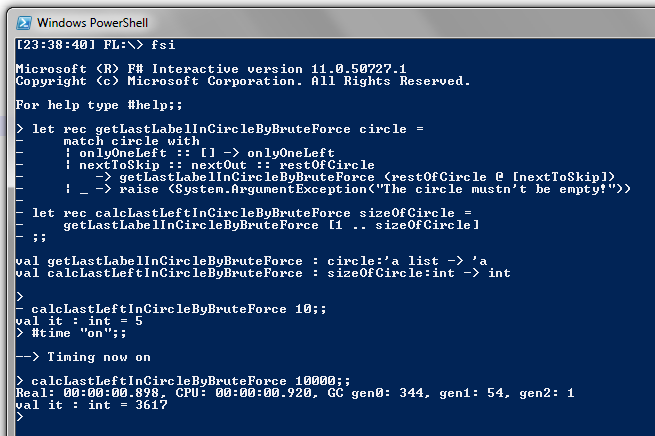
Let's run the fsi application and calculate the results for circles with 10 and 10,000 people (with timing switched on):
This appears to be quite slow. It took around 0.9 seconds to run the calculation for a circle with 10,000 people.
This is partly because "(restOfCircle @ [nextToSkip])" is an O(n) operation, where n is the size of restOfCircle.
Recursive computation
In the second post in the series I derived the basic equations needed to solve the problem:
My second F# script uses these equations to calculate the solution:
let rec calcLastLeftInCircleByHalving sizeOfCircle =
    let (div, rem) = (sizeOfCircle / 2, sizeOfCircle % 2)
    match (div,rem) with
    | (0,1) -> 1
    | (n,0) -> 2 * (calcLastLeftInCircleByHalving n) - 1
    | (n,1) -> 2 * (calcLastLeftInCircleByHalving n) + 1
    | (_,_) -> 0  // to suppress compiler warnings
Notice how closely the first 3 patterns correspond to the 3 formulae.
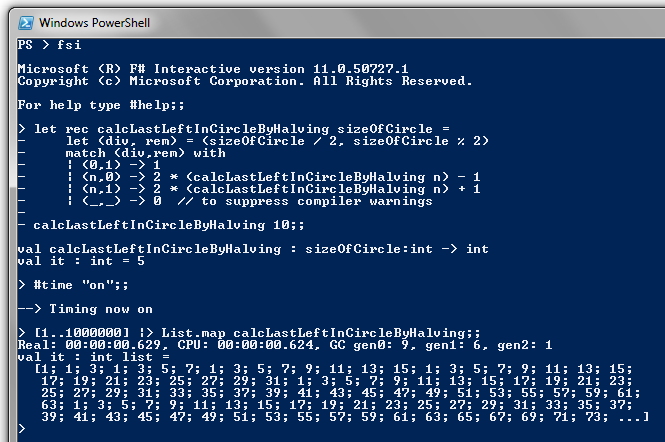
The code also runs much faster than the brute force approach. So much faster that it calculated all the numbers up to a million in 0.629 seconds!
Computation via the algebraic formula
In my third post of the series I derived an algebraic formula for the last person left in the circle:
$$
f(n) = 2n + 1 - 2^{{\lfloor log_2 n \rfloor} + 1} \tag{9}
$$
In F# this becomes:
let calcLastLeftInCircleByFormula n =
    let floorOfLog = System.Math.Floor(System.Math.Log( double n, 2.0) )
    2 * n + 1 - int ( 2.0 ** (floorOfLog + 1.0))
Note that System.Math is the static class in the .Net framework for Mathematical calculations. Its Log() method has an overload which takes the base of the logarithm as its second parameter.
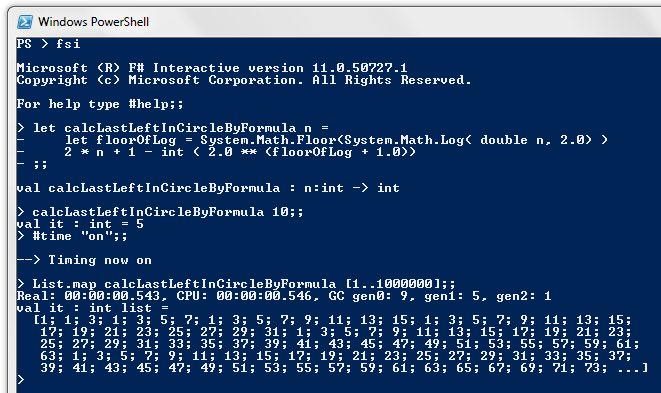
Running this for all the numbers up to a million takes 0.543 seconds - slightly quicker than the previous method...
Two things make me uncomfortable with this approach:
It feels inefficient to be doing floating point calculations to solve an integer problem.
I'm concerned that rounding errors could cause a calculation error
The rounding error concern is easily addressed. Simply add 0.5 to the value inside the int(...) conversion. But perhaps we should be avoiding floating point calculations altogether...
Computation via binary arithmetic
In the fourth post in the series I presented a very elegant rule for calculating the answer using binary representations.
This method can be re-stated (for computational convenience) as follows:
take the binary representation of the number
drop the leading digit
shift left
add 1
Let's convert that to F#:
First we need to find the leading digit, so we can drop it. This is equivalent to finding the highest power of 2 that is less than (or equal to) the number. In other words it's the term $2^{\lfloor log_2 n \rfloor}$ in the algebraic formula.
This is the same as finding the left-most bit in the binary representation of the number and setting all remaining bits to zero.
We can do this easily by repeatedly shifting the number to the right (the final bit drops out) and simultaneously shifting the number 1 to the left each time (this multiplies by 2, giving the next higher power of 2). Repeat until the original number is 1, and the other number will be the power of 2 we are looking for.
In F# the ">>>" operator does a bitwise right shift, and "<<<" does a left shift. So the following pair of F# functions calculate $2^{\lfloor log_2 n \rfloor}$:
let rec calcFirstBinaryDigit powerOf2 shiftedNumber =
    match shiftedNumber with
    | 0 -> raise (System.ArgumentException("No power of 2 is less than zero"))
    | 1 -> powerOf2
    | _ -> calcFirstBinaryDigit (powerOf2 <<< 1) (shiftedNumber >>> 1)

let calcHighestPowerOfTwoNotGreaterThan = calcFirstBinaryDigit 1
With this building block in place, we can easily express the binary calculation method as follows:
let calcLastLeftInCircleByBinaryFormula n =
    ((n - calcHighestPowerOfTwoNotGreaterThan n) <<< 1) + 1
The binary formula took 0.465 seconds, which is marginally faster than the floating point formula:
Comparing the results of the various methods
Now let's return to the original purpose of writing these various F# scripts, which was to check the Mathematics.
First I'm going to create a data structure to hold all the answers from the various methods for a single size of circle...
type circleCalculation = {
    SizeOfCircle: int;
    LastLeftInCircleByBruteForce: int;
    LastLeftInCircleByHalving: int;
    LastLeftInCircleByFormula: int;
    LastLeftInCircleByBinaryFormula: int
}
Then I'm going to create a function to perform the calculation of a single record. I want this function to have a parameter allowing me to switch off the brute force method if I want to, since I know it is much slower than the other methods:
let getCircleCalculation includeBruteForce sizeOfCircle =
    // Brute force is so slow to calculate. Provide the option to omit it...
    let lastLeftInCircleByBruteForce =
        match includeBruteForce with
        | true -> calcLastLeftInCircleByBruteForce sizeOfCircle
        | false -> 0
    let lastLeftInCircleByHalving = calcLastLeftInCircleByHalving sizeOfCircle
    let lastLeftInCircleByFormula = calcLastLeftInCircleByFormula sizeOfCircle
    let lastLeftInCircleByBinaryFormula = calcLastLeftInCircleByBinaryFormula sizeOfCircle
    let circleCalc = {
        SizeOfCircle = sizeOfCircle;
        LastLeftInCircleByBruteForce = lastLeftInCircleByBruteForce;
        LastLeftInCircleByHalving = lastLeftInCircleByHalving;
        LastLeftInCircleByFormula = lastLeftInCircleByFormula;
        LastLeftInCircleByBinaryFormula = lastLeftInCircleByBinaryFormula
    }
    circleCalc
Something that really amazed me is that I didn't need to specify the circleCalculation type in the function. F# is able to infer the data type from the usage pattern. Very neat!
With this in place, I can use the following script to check that the methods all match up:
// With brute force:
[1..1000] |> List.map (getCircleCalculation true) |> List.filter (
    fun cc -> cc.LastLeftInCircleByBinaryFormula <> cc.LastLeftInCircleByBruteForce
           || cc.LastLeftInCircleByBinaryFormula <> cc.LastLeftInCircleByHalving
           || cc.LastLeftInCircleByBinaryFormula <> cc.LastLeftInCircleByFormula
    )

// Without brute force:
[1..1000000] |> List.map (getCircleCalculation false) |> List.filter (
    fun cc -> cc.LastLeftInCircleByBinaryFormula <> cc.LastLeftInCircleByHalving
           || cc.LastLeftInCircleByBinaryFormula <> cc.LastLeftInCircleByFormula
    )
Running this shows that all the methods produce the same result. Mission accomplished...
Next time
In the next blog post in the series, I will show a different way of solving the problem. Instead of using the basic equations to recursively calculate a large number from the formula for smaller numbers, I'm going to work in the opposite direction.
What will emerge from this is a pattern of answers for successive values of the circle size. You might like to have a look at some of the earlier screen captures to see if you can work out what the pattern is.
More: An efficient algorithm for arbitrary intervals
Online research: In which I discover that it is called the Josephus problem
Introduction
In my first three posts in the series I derived Mathematical formulae for calculating the last person left in a circle if every second person is asked to leave (continuing until only one person remains).
In this post I am going to show a really neat way of calculating the answer. It is based on the binary number representation of the number of people in the circle.
If you are unfamiliar with the binary number system, then I suggest looking for a basic tutorial on binary numbers first.
The binary calculation rule
Take the binary representation of the number of people in the circle. Move the left-most (non-zero) bit to the end. Convert back to decimal and you have the number of the last person left.
In my third post of the series I derived an algebraic formula for the last person left in the circle:
$$
f(n) = 2n + 1 - 2^{{\lfloor log_2 n \rfloor} + 1} \tag{9}
$$
I'd like to write that formula slightly differently:
$$
f(n) = 2(n - 2^{\lfloor log_2 n \rfloor} ) + 1 \tag{10}
$$
$2^{\lfloor log_2 n \rfloor}$ is just the highest power of 2 that is less than (or equal to) the number. Now each position in a binary representation represents a power of 2. So this represents the left-most bit in the binary representation of n (and all other positions zero).
Then $n - 2^{\lfloor log_2 n \rfloor}$ is just the original number n with its first (non-zero) binary digit dropped (i.e. replaced with a zero). Let's call this number m.
In binary, you can multiply a number by 2 by shifting all its bits one place to the left. So 2m+1 is just a "left shift" of m and set the rightmost bit to 1.
So we can express the binary method as:
take the binary representation of the number
drop the leading digit
append a 1 (i.e. shift left and add 1)
convert back to decimal
But since we are dropping the leading 1, and appending a trailing 1, you could see this as rotating the first bit around to the end.
Next time
In the next post in the series, I will be writing code to calculate the answer using each of the methods presented in the first four posts.
More: An efficient algorithm for arbitrary intervals
Online research: In which I discover that it is called the Josephus problem
Introduction
In my first post of the series I described a situation where a number of people are sitting in a circle. Every second person is asked to leave. This continues until only one person remains. If the people are labelled 1 to N, what is the formula for that final person?
In the second post in the series I derived the basic equations needed to solve the problem:
$$
\begin{align*}
f(1) &= 1 \tag{1} \\
f(2n) &= 2.f(n) - 1 \tag{2} \\
f(2n+1) &= 2.f(n) + 1 \tag{3}
\end{align*}
$$
In this post I will use these equations to derive the formula for the label of the last person left.
In future posts I will show a more intuitive way of solving the problem (but still starting from these 3 equations).
Derivation
Equations 2 and 3 allow us to calculate the formula for a number in terms of the formula for a smaller number. Starting from any number we can keep on repeating this process until we get the formula in terms of f(1).
For example, suppose there are 10 people in the circle. Then:
$$
\begin{align*}
f(10) &= 2.f(5) - 1 & \text{by equation (2)} \\
&= 2.(2.f(2) + 1) - 1 & \text{by equation (3)} \\
&= 2.(2.(2.f(1) - 1) + 1) - 1 & \text{by equation (2)} \\
&= 2.(2.(2.(1) - 1) + 1) - 1 & \text{by equation (1)} \\
&= 2.(2.(1) + 1) - 1 \\
&= 2.(3) - 1 \\
&= 5 \\
\end{align*}
$$
We would like to apply this same process to an arbitrary number n. Hopefully a pattern will emerge that will allow us to generate a formula in terms of n.
One potential problem is that we do different things (add or subtract one), depending on whether the number at that step is odd or even. We can avoid this problem if we have a formula which doesn't depend on whether the argument is odd or even.
Fortunately it's quite easy to do. Just note that:
$$
2b-1 = \left\{
\begin{array}{l l}
-1 & \text{if $b = 0$}\\
+1 & \text{if $b = 1$}
\end{array} \right.
$$
So we can collapse equations 2 and 3 into this equation:
$$
\begin{align*}
f(2n + b) = 2.f(n) + 2b - 1 & \text{ where b $\in \{0,1\}$}\tag{4} \\
\end{align*}
$$
Equations 2 and 3 depend on whether the number we are solving for is odd or even. And the number we are solving for halves after each step. My first instinct on seeing this pattern was to express n as a binary number:
Suppose that:
$$
2^{k} \leq n < 2^{k+1}
$$
Then we can express n as:
$$
\begin{align*}
n = \sum_{{i}={0}}^{k}{a_{i}.2^i} & \text{ where $a_{i} \in \{0,1\}$}\tag{5}
\end{align*}
$$
Note that the leading binary digit must be 1:
$$
a_{k} = 1 \tag{6}
$$
We're also going to need a well-known equation for binary sums:
$$
\sum_{{i}={0}}^{k-1}2^{i} = 2^{k} - 1 \tag{7}
$$
This is really just saying that if all the binary digits in a number are 1, then adding 1 will cause all columns to clock over to give the next higher power of 2. This is similar to how addition works in the decimal system. For example:
$$
10^{3} - 1 = 1000 - 1 = 999 = \sum_{{i}={0}}^{2}{9.10^{i}} = \sum_{{i}={0}}^{2}{(10-1).10^{i}}
$$
Let's carry out the steps to derive the formula for f(n):
$$
\begin{align*}
f(n) &= f( \sum_{{i}={0}}^{k}{a_{i}.2^i} ) & \text{by equation (5)} \\
&= f( 2 \sum_{{i}={1}}^{k}{a_{i}.2^{i-1}} + a_{0} ) \\
&= 2.f( \sum_{{i}={1}}^{k}{a_{i}.2^{i-1}} ) + 2 a_{0} - 1 & \text{by equation (4)} \\
&\text{Let's rewrite this formula as follows:} \\
f(n) &= 2.f( \sum_{{i}={1}}^{k}{a_{i}.2^{i-1}} ) + \sum_{{i}={0}}^{0}[(2 a_{i}-1).2^{i}] & \text{after step 1} \\
&= 2.f( 2 \sum_{{i}={2}}^{k}{a_{i}.2^{i-2}} + a_{1} ) + \sum_{{i}={0}}^{0}[(2 a_{i}-1).2^{i}] \\
&= 2.[2.f( \sum_{{i}={2}}^{k}{a_{i}.2^{i-2}}) + 2 a_{1} - 1] + \sum_{{i}={0}}^{0}[(2 a_{i}-1).2^{i}] & \text{by equation (4)} \\
&= 2^{2}.f( \sum_{{i}={2}}^{k}{a_{i}.2^{i-2}}) + 2^{1}[2 a_{1} - 1] + \sum_{{i}={0}}^{0}[(2 a_{i}-1).2^{i}] \\
&= 2^{2}.f( \sum_{{i}={2}}^{k}{a_{i}.2^{i-2}}) + \sum_{{i}={0}}^{1}[(2 a_{i}-1).2^{i}] & \text{after step 2} \\
&= \text{ ...} \\
&= 2^{j}.f( \sum_{{i}={j}}^{k}{a_{i}.2^{i-j}}) + \sum_{{i}={0}}^{j-1}[(2 a_{i}-1).2^{i}] & \text{after some step j, $1 \leq j \leq k $} \\
&= \text{ ...} \\
&= 2^{k}.f( \sum_{{i}={k}}^{k}{a_{i}.2^{i-k}}) + \sum_{{i}={0}}^{k-1}[(2 a_{i}-1).2^{i}] & \text{after step k} \\
\end{align*}
$$
So what I've done is to break the formula on the right into two terms, each with a summation. Then I've progressively eaten away at the left summation while building up the right.
Now we just need to expand and simplify:
$$
\begin{align*}
f(n) &= 2^{k}.f( \sum_{{i}={k}}^{k}{a_{i}.2^{i-k}}) + \sum_{{i}={0}}^{k-1}[(2 a_{i}-1).2^{i}] \\
&= 2^{k}.f(a_{k}) + 2 [\sum_{{i}={0}}^{k-1}a_{i}.2^{i}] - \sum_{{i}={0}}^{k-1}2^{i} \\
&= 2^{k}.f(a_{k}) + 2 [\sum_{{i}={0}}^{k-1}a_{i}.2^{i} + a_{k}.2^{k} - a_{k}.2^{k} ] - (2^{k} - 1) & \text{ by equation (7)} \\
&= 2^{k}.f(1) + 2 [\sum_{{i}={0}}^{k}a_{i}.2^{i} - 1.2^{k} ] - 2^{k} + 1 & \text{ since $a_{k} = 1$ by equation (6)} \\
&= 2^{k}.1 + 2 [\sum_{{i}={0}}^{k}a_{i}.2^{i} - 2^{k} ] - 2^{k} + 1 & \text{ by equation (1) } \\
&= 2^{k} + 2 [n - 2^{k} ] - 2^{k} + 1 & \text{ by equation (5) } \\
&= 2^{k} + 2n - 2^{k+1} - 2^{k} + 1 \\
&= 2n+1 - 2^{k+1} & \tag{8} \\
\end{align*}
$$
Since we can easily calculate k from n, that is our solution.
The calculation method
Let's summarize how we solve this for a particular value of n:
Double n and add 1
Find the largest power of 2 that is less than or equal to n, and double it
Subtract the second number from the first
That is your answer!
Let's check it using our previous example of n = 10:
$$
2^{3} \leq 10 < 2^{4}
$$
Hence k = 3.
So:
$$
\begin{align*}
f(10) &= 2 \times 10 + 1 - 2^{3+1} \\
&= 20 + 1 - 2^{4} \\
&= 21 - 16 \\
&= 5 \\
\end{align*}
$$
Which is the answer we got previously!
The algebraic formula
If we want to formalize things we can also express the formula in terms of n only. Simply note that:
$$ k = \lfloor log_2 n \rfloor $$
So that:
$$
f(n) = 2n + 1 - 2^{{\lfloor log_2 n \rfloor} + 1} \tag{9}
$$
Conclusion
So now we have a formula. But it took a lot of algebra. And we still don't have an intuitive feel for why the formula comes out the way it does.
In my next few blog posts I'm going to present a different way of looking at the problem. Instead of going straight for brute force calculation, we are going to apply a bit more insight first.
More: An efficient algorithm for arbitrary intervals
Online research: In which I discover that it is called the Josephus problem
Introduction
In my previous blog entry I described a problem from the 2010 South African Mathematics Olympiad. In the next few posts I'm going to show you a few ways of solving the problem. But in this blog entry, I'm just going to set up the equations which the various solutions will all make use of.
Let's start with a recap of the problem...
Imagine n people sitting in a circle. Label them 1 to n in a clockwise direction. Imagine walking around the circle tapping every second person on the shoulder (person 2, 4, 6 and so on). People leave the circle when they are tapped. This continues until only one person is left. What is the label of that person?
Derivation
Firstly let's define f(n) to be the label of the last person remaining when there are n people in the circle.
Clearly f(1) = 1.
What we'd like to do is find expressions for f(n) in terms of f(m) where m is smaller than n.
Every second person is being asked to leave with roughly half as many people remaining after each walk around the circle. This suggests that we should consider the cases of n being odd and even separately.
So let's see what happens when there are an even number of people around the circle, say 2n people.
In our first trip around the circle, the n even numbered people will leave the circle. This will leave n odd-numbered people.
Let's re-label these odd people as 1, 2, ..., n. Then the (new) label of the last person remaining would equal f(n). That comes straight from the definition of f(n).
But we are interested in the original label of this last person. That is not f(n) but 2.f(n) - 1. This is because 2k - 1 is the kth odd number.
Hence f(2n) = 2 f(n) - 1.
Next we will find a similar formula for circles with an odd number of people.
We already have a formula for n = 1. All other positive odd numbers can be expressed as 2n+1 for some positive integer n.
Initially the situation looks like this for 2n+1 people:
We would like to express f(2n+1) in terms of f(n). That means still having n people in the circle after the first round of removals.
To do this we need to remove n+1 people. The first n people removed are all even numbered as before. But now the (n+1)th person removed is person number 1. This leaves the following arrangement:
Note that the kth person in the new circle of people has a label of 2k+1.
So we can re-label the remaining people from 1 to n as before, and f(n) is the new label of the last person remaining if we continue the elimination process. But in the original labelling scheme, this becomes 2.f(n) + 1.
So we have shown that f(2n+1) = 2.f(n) + 1.
The basic equations
If we put all of this together, we get the following set of equations (where n is a positive integer):
More: An efficient algorithm for arbitrary intervals
Online research: In which I discover that it is called the Josephus problem
Introduction
Some months back I discovered the web site of the SA Math Foundation including past papers for the South African Mathematics Olympiad. Back in high school I used to love solving Mathematics problems. So I downloaded a bunch of question papers and starting solving some of them.
This series of blog postings describes some interesting solutions I found to one of the problems.
[Edit: I've since discovered that it is known as the Josephus problem]
The problem statement
One of the first papers I glanced at was the 2010 senior paper, second round.
The first question described a situation in which there are 10 people in a circle, and every 2nd person is asked to leave the circle. This continues until only one person remains. If we number the people 1 to 10, and eliminate person 2 then 4 and so on, what is the number of the last person left?
So it works much like the children's game "One potato, two potato", except that every 2nd person is eliminated, not every 8th person.
The plan
Later I was thinking back to the problem and made a fortuitous mistake. I accidentally thought that the problem was phrased as 2010 people, not 10 people (Math Olympiad problems often use the current year in the problem statement).
So I ended up solving the problem generally, not just for the number 10 (which can easily be solved by brute force).
In the next few blog postings I intend to show you a few solutions to the problem. As I did with the Pyramid of Hexagons problem, I want to provide an algebraic proof as well as intuitive insight into why the proof is true.
So my plan is as follows:
First I will generate the basic equations which all the solutions will use
Thereafter I will provide my first algebraic solution
Then I will try to give some insight into an interesting pattern behind the formula Hint: There is a link to the binary number system.
Then I will give a simpler proof inspired by this pattern.
And finally I will provide the code I wrote to generate the illustrations.
Disclaimer
While the visualization should be very helpful, it's not going to be as striking as my Pyramid of Hexagons visualization.
So I'm hoping that a reader of this blog will be able to find an even more elegant way of explaining the formula.
We recently had an issue at work where CPU utilizations on our app servers started "flat-lining" at 100%. This starved our WCF service hosts of CPU cycles, leading to complaints of slow performance.
The performance decline was dramatic and it didn't occur straight after a release. This suggested that something had changed elsewhere in the organisation.
The approach on our project has been to regularly release new modules side-by-side with the legacy system. Integration messages keep the data in the two systems synchronized. This significantly minimizes risk compared to a "big bang" approach.
But some users continue using the old system surreptitiously. Printing is a case in point. Print driver issues had been a frequent source of problems in the past. So some users had gone back to using the old system for printing.
Unbeknownst to us, the legacy team had removed the ability to print documents through the legacy system. So the printing load had suddenly increased by 50%.
This led to other problems in the system. For example, our performance logging queue started building up on one of the app servers. Messages are inserted in parallel, but the logging service is throttled to only process one message at a time. So when the logging service is starved of CPU cycles, it starts falling behind. This leads to a constant drain on CPU, making further "flat-lining" more likely.
We had been aware for some time that printing could cause performance problems. So fortunately I already had a design in place for moving most of the printing load onto the print servers, where CPU was under-utilized. But it would take a week or two to develop and test the code.
As an interim solution we commissioned a few more app servers.
To check whether printing was the sole source of problems, I took some random snapshots of resource monitor graphs on one of the application servers. At times printing was clearly causing the CPU to flatline at 100%. But at other times the app servers flatlined when no printing was taking place. So I suspected that printing was not the only cause of high CPU usage. Instead of app servers being able to recover from short-lived "distress states", the extra printing load had caused performance to reach a runaway situation.
To quantify this, I wrote a Powershell script to use WMI to sample CPU utilization for each process on each app server. I wrote the results to a csv file, opened it in Excel, and generated a pivot table off the data.
This highlighted some other issues that we hadn't been aware of before. For example, there was an SNMP monitoring process, SysEdge, which was consuming 25% CPU on 3 of the app servers for long periods each morning. I alerted the infrastructure team and they were able to fix this issue so that SysEdge was consuming under 1% CPU on all app servers.
param (
    [string[]] $serverNames = $( throw 'The list of server names was not provided' ),
    [int] $coresPerServer = $( throw 'The number of cores per server was not provided' ),
    [int] $repetitions = 1,
    [int] $intervalInSeconds = 60
)

1..$repetitions | foreach-object {
    $repetition = $_
    [DateTime] $now = [DateTime]::Now
    Write-Host "Getting CPU utilizations at $now (repetition $repetition)" -foregroundColor Green

    foreach ($server in $serverNames)
    {
        Write-Host "    Getting processes on $server" -foregroundColor Cyan

        $prc = gwmi Win32_PerfFormattedData_PerfProc_Process -computerName $server  # To get around bug where it is zero the first time called
        $prc = gwmi Win32_PerfFormattedData_PerfProc_Process -computerName $server | ? { $_.Name -ne '_Total' -and $_.Name -ne 'Idle' }
        $recordedAt = [DateTime]::Now

        $summary = $prc | select-object IDProcess,Name,PercentProcessorTime,WorkingSet,@{n='PercentTime';e={$_.PercentProcessorTime/$coresPerServer}}

        foreach ($processSummary in $summary)
        {
            $processName = $processSummary.Name
            $processName = ($processName.Split('#'))[0]
            $percentTime = $processSummary.PercentTime
            $workingSet = $processSummary.WorkingSet

            $record = new-object -typeName 'PSObject' -property @{
                Server = $server
                Process = $processName
                Repetition = $repetition
                AvgCPU = [Math]::Round( $percentTime, 2 )
                WorkingSet = $workingSet
                RecordedAt = $recordedAt
                Year = $recordedAt.Year
                Month = $recordedAt.Month
                Day = $recordedAt.Day
                DayOfWeek = $recordedAt.DayOfWeek
                Hour = $recordedAt.Hour
                Minute = $recordedAt.Minute
            }
            $record
        }
    }

    $timeTillNextRepetition = $now.AddSeconds($intervalInSeconds) - [DateTime]::Now
    $secondsToWait = $timeTillNextRepetition.TotalSeconds
    if ($secondsToWait -gt 0)
    {
        Start-Sleep -Seconds $secondsToWait
    }
}
A few notes on the Powershell script...
You will notice that I make the WMI call twice. This is because the first call for a particular app server will return all zeroes. I suspect the first call for each app server could be moved outside the loop (e.g. have a loop zero whose data is discarded). But it was good enough for my purposes.
I also kept the following piece of code to illustrate a point...
I used to write code like this a lot, assigning the $_ iteration variable to another variable. This was for 2 reasons...
Firstly, for debugging purposes. I would assign the variable a value to test. Then copy the remainder of the inner script block into the Powershell REPL.
And secondly, so that I could nest loops but still access the outer iteration variable.
However there is an easier way to get the same effect...
foreach ($repetion in 1..$repetitions) {
    ...
}
We have since gone live with the new printing solution. And so far things are looking very promising. CPU load has only decreased slightly, but its "spikiness" seems to have improved significantly. Average execution times of service calls appear to have decreased by up to 18% at the busiest time of day. And it certainly looks like the print processes are terminating faster than before, presumably because print spooling is now taking place locally.
This is also the first time that we have moved an asynchronous process to a different server, thus improving the performance of the synchronous processes which affect user perception of speed. I can see a lot of opportunity for doing more of this in future.
For the past couple of years I've been involved in a long-running project to replace many of the software applications for a large hospital network. For much of that time I've been the team lead for the production support team (although more recently my role has changed to being the team's designer, using Enterprise Architect to create UML diagrams for various enhancements to deployed modules).
Over that time I've spent a lot of time troubleshooting and fixing performance issues. This has ranged from identifying and fixing problems caused by database blocking, hunting down memory leaks with windbg and sosex and investigating the causes of high CPU utilization on app servers.
My approach invariably starts with finding a way to gather the right data to allow me to pinpoint where the problem lies.
Even in a high pressure severity 1 outage, this is still my most common starting point. The data allows me to cut out a whole lot of areas of the system for further investigation. With just a few areas to look at in detail, I can then delegate in-depth troubleshooting across team members.
In a crisis, the last thing you must do is panic and take a shotgun approach to looking for problems. First make sure you understand the problem. Data is a very objective way of doing this. But you can't do that unless you have data readily at hand and a toolkit of scripts and habits for rapidly gathering and analyzing that data.
The general purpose tools that I keep on using are Powershell and Excel pivot tables.
These are complemented by specific sources of data for each layer of the application, such as:
Various SQL DM views and query plans for understanding SQL performance problems
Our performance logs (saved to the database) for analyzing WCF service call durations
WMI for app server and print server performance
Memory dumps for memory leak issues at the client
In addition to this, there are some other tools that are very useful for getting a gut feel for a problem, such as SCOM (Systems Center Operations Manager) and Windows Resource Monitor.
SCOM graphs are great for getting a high level view of what's happening across a range of servers.
Resource Monitor is very useful for seeing what's happening on your servers at a point in time. The Process Explorer utility from the sysinternals suite is more powerful (we have it installed on all our app servers). But I've found that Resource Monitor is usually good enough for my purposes.
Interestingly enough, I haven't yet needed to use a code profiler, though this is probably the tool most developers think of first when you mention performance troubleshooting.
Even when the problem is with the code, there are usually other ways of pinpointing which code is at fault.
For example, one of the developers wrote code to hook into the NHibernate layer and write a debug message whenever a possible N+1 selects problem was detected. So those kind of problems can be picked up by the "new development" teams before they get deployed into the production environment.
We also have a Castle Dynamix Proxy interceptor which hooks into the web service proxy and logs performance data for every WCF service call made.
We have a monthly release cycle, and after each release we run a query against the performance logs to look for service calls which are performing significantly worse than a month earlier (this is the only reasonable baseline, since service call volumes differ significantly by day of the week and time of the month). So this also helps us to find poorly performing code without the need for a profiler.
Over the coming months I would like to share more details with you, including some of the Powershell and SQL scripts I've written to gather and analyze the data.
In my previous post I provided a visual explanation of why a pyramid of hexagons is cubic. I created the visuals for that post using Blender 2.64 and Python. For those interested in playing with the Blender model, I have uploaded it (with its embedded Python script) to this Google docs drive.
Bear in mind that this is my first foray into both Blender and Python. So it's unlikely to be "idiomatic" Python or an example of Blender best practices!
To reduce size, the model only contains various cameras and lights. These are contained in layers 0, 8, 9, 10, 18 and 19 as can be seen at the bottom of the 3D view:
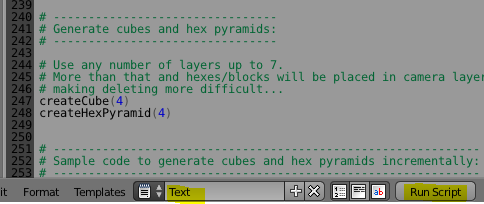
To create the blocks and hexagons you need to run the embedded script. First change from the "Default" layout to "Scripting" layout. Ensure the "Text" script is selected. And click on the "Run script" button.
Then change back to the default layout. You will see that layers 1 to 4 and 11 to 14 now show dots to indicate that they contain objects:
Layers 1 to 4 (the numbering starts at zero) in the top left block contain the various shells making up the cube. Layers 11 to 14 in the bottom left block contain the various layers making up the pyramid.
Since these two structures overlap, you shouldn't select both at the same time.
However when you want to start again, you should select just these 8 layers, hit A to toggle selection of all objects, and DELETE to delete the objects. Make sure you haven't selected any of the layers with cameras and lights, otherwise you will accidentally delete these too.
Use F12 to render the image as seen by the selected camera. But first you need to make sure that you have selected the layer that the camera and light are in, otherwise you will just see a silhouette.
Also make sure that the correct camera is selected for the scene...
The Python script allows you to generate an entire cube or Pyramid of a particular size using the following lines of code at the end of the script:
createCube(4)
createHexPyramid(4)
However you can also generate just part of the structure. This gives more insight into how the cube can be constructed from the cornerstone outwards. For example, the following code generates the outermost ring of the outermost shell in a 4x4x4 cube:
createRingOfBlocks(4, 4, 4)
And here is the code that does the same for the pyramid:
I calculated the South-Western line of blocks to start from the orange block going to the yellow block (in fact, originally the orange block was coloured red). My thinking was to label each line from 0 to n-1, but ignore hex zero (since it is also hex n-1 of the previous line). It turned out that wasn't the best idea as far as hex colours go.
Instead of re-calculating the formulae for all the hexagons, I took a short-cut and simply remapped the colour of each hexagon as if it was the hexagon following it (in clockwise order)...
def getColorForBlockOrHex(layer, ring, direction, position):
    # There is a better colour scheme than the one I chose.
    # Luckily it is easy to change to it.
    # Each hex/block uses the colour that the hex after it would have been assigned.
    (direction, position) = getDirAndPosOfNextClockwiseBlockOrHex( direction, position, ring)
    startColor = getStartColorForDirection(direction)
    if ring == 1 or ring == 2:
        (r, g, b) = startColor
    else:
        nextDir = getNextDir(direction)
        endColor = getStartColorForDirection(nextDir)
        (r1, g1, b1) = startColor
        (r2, g2, b2) = endColor
        ratio1 = (ring - position)/(ring-1)
        ratio2 = (position - 1)/(ring-1)
        r = ratio1 * r1 + ratio2 * r2
        g = ratio1 * g1 + ratio2 * g2
        b = ratio1 * b1 + ratio2 * b2
    return (r,g,b)
Here is the full Python script:
import bpy
import math

from math import *

# From http://blenderscripting.blogspot.com/2011/05/blender-25-python-selecting-layer.html:
def selectLayer(layer):
    return tuple(i == layer for i in range(0, 20))

# From http://wiki.blender.org/index.php/Dev:2.5/Py/Scripts/Cookbook/Code_snippets/Materials_and_textures:
def makeMaterial(name, diffuse, specular, alpha):
    mat = bpy.data.materials.new(name)
    mat.diffuse_color = diffuse
    mat.diffuse_shader = 'LAMBERT'
    mat.diffuse_intensity = 1.0
    mat.specular_color = specular
    mat.specular_shader = 'COOKTORR'
    mat.specular_intensity = 0.5
    mat.alpha = alpha
    mat.ambient = 1
    return mat

def setMaterial(ob, mat):
    me = ob.data
    me.materials.append(mat)

# ************************************************
# Following code by Andrew Tweddle, November 2012:
# ************************************************

# -----------------------------------
# Code common to blocks and hexagons:
# -----------------------------------

class Direction:
    C = 0
    SW = 1
    W = 2
    NW = 3
    NE = 4
    E = 5
    SE = 6

def DirToString(direction):
    if direction == Direction.C:
        return "C"
    elif direction == Direction.SW:
        return "SW"
    elif direction == Direction.W:
        return "W"
    elif direction == Direction.NW:
        return "NW"
    elif direction == Direction.NE:
        return "NE"
    elif direction == Direction.E:
        return "E"
    else:
        return "SE"


def getNextDir(direction):
    if direction == Direction.C:
        return Direction.C
    elif direction == Direction.SE:
        return Direction.SW
    else:
        return direction + 1

def getDirAndPosOfNextClockwiseBlockOrHex(direction, position, ring):
    if direction == Direction.C:
        return (direction, position)
    if position == ring - 1:
        newDir = getNextDir(direction)
        return (newDir, 1)
    return (direction, position + 1)

def getStartColorForDirection(direction):
    if direction == Direction.C:
        return (1,1,1)  # White
    elif direction == Direction.SW:
        return (1, 0, 0)  # Red
    elif direction == Direction.W:
        return (1, 1, 0)  # Yellow
    elif direction == Direction.NW:
        return (0, 1, 0)  # Green
    elif direction == Direction.NE:
        return (0, 1, 1) # Cyan
    elif direction == Direction.E:
        return (0, 0, 1)  # Blue
    else:  # direction == Direction.SE
        return (1, 0, 1)  # Magenta

def getColorForBlockOrHex(layer, ring, direction, position):
    # There is a better colour scheme than the one I chose.
    # Luckily it is easy to change to it.
    # Each hex/block uses the colour that the hex after it would have been assigned.
    (direction, position) = getDirAndPosOfNextClockwiseBlockOrHex( direction, position, ring)
    startColor = getStartColorForDirection(direction)
    if ring == 1 or ring == 2:
        (r, g, b) = startColor
    else:
        nextDir = getNextDir(direction)
        endColor = getStartColorForDirection(nextDir)
        (r1, g1, b1) = startColor
        (r2, g2, b2) = endColor
        ratio1 = (ring - position)/(ring-1)
        ratio2 = (position - 1)/(ring-1)
        r = ratio1 * r1 + ratio2 * r2
        g = ratio1 * g1 + ratio2 * g2
        b = ratio1 * b1 + ratio2 * b2
    return (r,g,b)


# ----------------------------------
# Code specific to blocks and cubes:
# -----------------------------------

def getBlockPositionInLastLayer(ring, direction, position):
    if direction == Direction.C:
        return (0,0,0)
    elif direction == Direction.SW:
        return (ring-1, ring-position-1,0)
    elif direction == Direction.W:
        return (ring-1, 0,position)
    elif direction == Direction.NW:
        return (ring-position-1, 0, ring-1)
    elif direction == Direction.NE:
        return (0, position,ring-1)
    elif direction == Direction.E:
        return (0, ring-1, ring-position-1)
    else:  # direction == Direction.SE
        return (position, ring-1, 0)

def createBlock(layer, ring, direction, position, numberOfLayers):
    (x,y,z) = getBlockPositionInLastLayer(ring, direction, position)
    if layer < numberOfLayers:
        offset = numberOfLayers-layer
        (x,y,z) = (x+offset,y+offset,z+offset)
    blockName = "Block_L" + str(layer) + "R" + str(ring) + DirToString(direction) + "_" + str(position)
    blenderLayer = layer - ring + 1  # For bottom-up layering use: blenderLayer = layer
    layerSelection = selectLayer(blenderLayer)
    bpy.context.scene.layers[blenderLayer] = True  # Otherwise bpy.context.object is not the newly added cube!
    bpy.ops.mesh.primitive_cube_add(location=(x, y, z), layers=layerSelection)
    bpy.context.object.name = blockName
    bpy.context.object.dimensions = (0.995,0.995,0.995)
    # Note: Made it slightly smaller to create shadows between adjacent blocks of the same colour
    #
    # Create a material for the new block:
    diffuseColor = getColorForBlockOrHex(layer, ring, direction, position)
    matName = "Mat_" + blockName
    mat = makeMaterial(name = matName, diffuse = diffuseColor, specular=(1,1,1), alpha=1)
    setMaterial(bpy.context.object, mat)

def createLineInRingOfBlocks(layer, ring, direction, numberOfLayers):
    for pos in range(1,ring):
        createBlock(layer, ring, direction, pos, numberOfLayers)

def createRingOfBlocks(layer, ring, numberOfLayers):
    if ring == 1:
        createBlock(layer, 1, Direction.C, 1, numberOfLayers)
    else:
        for dir in range(1,7):
            createLineInRingOfBlocks(layer, ring, dir, numberOfLayers)

def createLayerOfBlocks(layer, numberOfLayers):
    for ring in range(1,layer+1):
        createRingOfBlocks(layer, ring, numberOfLayers)

def createCube(numberOfLayers):
    for layer in range(1, numberOfLayers+1):
        createLayerOfBlocks(layer, numberOfLayers)


# ----------------------------------
# Code specific to hexagons:
# -----------------------------------
def getHexPositionOnFlatSurface(ring, direction, position, radius):
    sqrt3 = math.sqrt(3)
    if direction == Direction.C:
        return ( 0, 0)
    elif direction == Direction.SW:
        return ( -1.5 * position * radius, -sqrt3 * (ring-1) * radius + sqrt3 / 2 * position * radius)
    elif direction == Direction.W:
        return ( -1.5 * (ring - 1) * radius, -sqrt3 / 2 * (ring - 1 - 2 * position ))
    elif direction == Direction.NW:
        return ( -1.5 * (ring - 1 - position) * radius, sqrt3 / 2 * (ring - 1 + position ) * radius )
    elif direction == Direction.NE:
        return ( 1.5 * position * radius, sqrt3 * ( ring - 1 - position / 2 ) )
    elif direction == Direction.E:
        return ( 1.5 * (ring-1) * radius, sqrt3 / 2 * radius * ( ring - 1 - 2 * position))
    else:  # direction == Direction.SE
        return ( 1.5 * radius * ( ring - 1 - position), - sqrt3 / 2 * radius  * ( ring - 1 + position ))

def getHexPosition(layer, ring, direction, position, numberOfLayers, radius, thickness):
    (x,y) = getHexPositionOnFlatSurface(ring, direction, position, radius)
    z = thickness * (numberOfLayers - layer)
    return (x,y,z)

def createHexTile(layer, ring, direction, position, numberOfLayers, radius, thickness):
    (x,y,z) = getHexPosition(layer, ring, direction, position, numberOfLayers, radius, thickness)
    hexName = "Hex_L" + str(layer) + "R" + str(ring) + DirToString(direction) + "_" + str(position)
    blenderLayer = 10 + layer - ring + 1  # For bottom-up layering, use blenderLayer = 10 + layer
    # Note: hexagons are in a separate set of layers from blocks
    layerSelection = selectLayer(blenderLayer)
    bpy.context.scene.layers[blenderLayer] = True  # Otherwise bpy.context.object is not the newly added cube!
    # Make it slightly smaller to create shadows between adjacent hexes of the same colour:
    adjustedThickness = thickness * 0.995
    adjustedRadius = radius * 0.995
    bpy.ops.mesh.primitive_cylinder_add(vertices=6, radius=adjustedRadius, depth=adjustedThickness, end_fill_type='NGON', location=(x,y,z), rotation=(0,0,radians(30)), layers=layerSelection)
    bpy.context.object.name = hexName
    # Create a material for the new hex tile:
    diffuseColor = getColorForBlockOrHex(layer, ring, direction, position)
    matName = "Mat_" + hexName
    mat = makeMaterial(name = matName, diffuse = diffuseColor, specular=(1,1,1), alpha=1)
    setMaterial(bpy.context.object, mat)

def createLineInRingOfHexTiles(layer, ring, direction, numberOfLayers, radius, thickness):
    if ring == 1:
        createHexTile(layer, 1, Direction.C, 1, numberOfLayers, radius, thickness)
    else:
        for pos in range(1,ring):
            createHexTile(layer, ring, direction, pos, numberOfLayers, radius, thickness)

def createRingOfHexTiles(layer, ring, numberOfLayers, radius, thickness):
    if ring == 1:
        createLineInRingOfHexTiles(layer, ring, Direction.C, numberOfLayers, radius, thickness)
    else:
        for dir in range(1,7):
            createLineInRingOfHexTiles(layer, ring, dir, numberOfLayers, radius, thickness)

def createLayerOfHexTiles(layer, numberOfLayers, radius, thickness):
    for ring in range(1,layer+1):
        createRingOfHexTiles(layer, ring, numberOfLayers, radius, thickness)

def createHexPyramid(numberOfLayers, radius = 1, thickness = 1):
    for layer in range(1, numberOfLayers+1):
        createLayerOfHexTiles(layer, numberOfLayers, radius, thickness)


# --------------------------------
# Generate cubes and hex pyramids:
# --------------------------------

# Use any number of layers up to 7.
# More than that and hexes/blocks will be placed in camera layers,
# making deleting more difficult...
createCube(4)
createHexPyramid(4)


# -------------------------------------------------------------
# Sample code to generate cubes and hex pyramids incrementally:
# -------------------------------------------------------------

# You can build up the cube incrementally e.g.
# createLineInRingOfBlocks(4, 4, Direction.SW, 4)
# createLineInRingOfHexTiles(4, 4, Direction.SW, 4, radius=1, thickness=1)
#
# createRingOfBlocks(4, 4, 4)
# createRingOfHexTiles(4, 4, 4, radius=1, thickness=1)
Below is a "pyramid" made out of hexagonal blocks:
Surprisingly, such a structure always contains a cubic number of hexagonal tiles (aka hexes). The structure above is 4 high and contains 4 x 4 x 4 = 64 hexes.
Let's look at the pyramid of hexagons from almost directly above. See how each hex has an equivalent block in the cube...
But what about the hidden pieces in the pyramid and cube - do they also correspond directly?
Yes, they do. The visible pieces of each structure form a "shell" over that structure. Remove these shells and you are left with a smaller pyramid and cube. The outer shells of these smaller structures map across in exactly the same way. Keep on peeling away the layers and you see that every hex tile maps to a unique block in the cube and vice versa.
I set up a spreadsheet to show how this nesting works...
And that, my friends, is how beautiful Mathematics can be!